This research was done and published back in 2018 on a different blog. Sadly, that blog was lost to the annals of time so for the sake of keeping knowledge available, it is paraphrased here. All vulnerabilities described here have already been mitigated a long time ago.
My colleagues and I are always analyzing the security of things, it’s simply our second nature. So when I installed Anna from Plugwise (an IoT thermostat) at home, I noticed a couple of things that got my spider senses tingling. When setting up Anna, you need to go to a web interface to configure the device. At a specific settings page, I received a 500 status status page with a full Lua stack trace. Clearly a smoking gun, so to ensure this would not undermine my home security a deep dive was required!\
Exploring the hardware
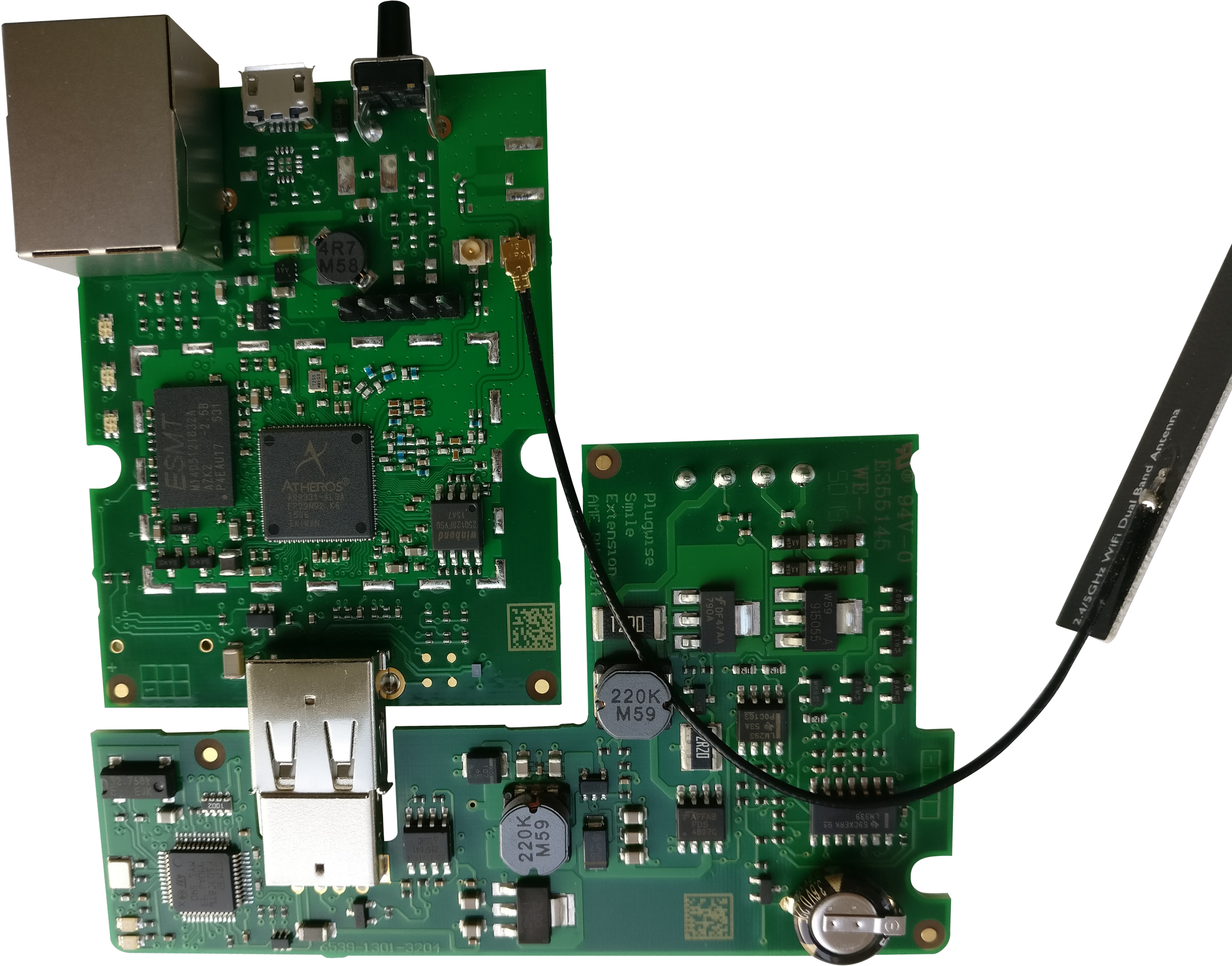
For any security aware person with some basic electronics knowledge, the PCB was like a treasure trove; everything clearly labeled and some debug headers to boot! You can clearly see the main microcontroller, RAM and Flash. Moreover, tracing the 5-pin header shows that this is indeed an UART debug interface. Surely this is disabled in production?!
*********************************************
*   U-Boot 1.1.4  (Mar 15 2016, 17:25:41)   *
*********************************************

AP121 (AR9331) U-Boot R03 for AME (redacted)

DRAM:   64 MB DDR2 16-bit
FLASH:  Winbond W25Q128 (16 MB)
CLOCKS: 400/400/200/33 MHz (CPU/RAM/AHB/SPI)

LED on during eth initialization...

Hit any key to stop autobooting:  0

Booting image at: 0x9F050000

   Image name:   MIPS OpenWrt Linux-3.7.9
   Created:      2018-03-07  12:24:17 UTC
   Image type:   MIPS Linux Kernel Image (lzma compressed)
   Data size:    1000748 Bytes = 977.3 kB
   Load address: 0x80060000
   Entry point:  0x80060000

Uncompressing kernel image... OK!
Starting kernel...
Alas, simply connecting an UART cable to the UART and hitting a key to stop the autobooting process, we obtained runtime control over Anna. The CLI interface presented by U-Boot can be used in a myriad of ways including reading flash memory. This whetted my appetite, I wanted to dive deeper and for that I needed to have a flash dump of the file system.
Going deeper
One possibility to obtain the file system is to directly read out the flash IC (winbond 25Q128FV) using of the shelve tools. However, we already have access to the U-Boot shell, why not use that?
for x in range(0, 2):
	base_address = 0x9F000000
	size = 1024 * 1024 * 16
	block_size = 1024 * 4
	print('Starting dumping')
	with open('dump_{0:d}_{1:08X}.bin'.format(x, base_address), 'wb') as f:
		for j in range (0, size // block_size):
			com.write('md.b {offset:x} {block_size:x}\n'.format(
				offset=base_address + j * block_size,
				block_size=block_size).encode('ascii')
			)
			com.readline()

			for i in range (0, block_size//16):
				r = com.readline()[10:57].decode('ascii').replace(' ', '')
				if len(r) != 32:
					print('Panic, not received all bytes!')
				f.write(binascii.unhexlify(r))

			if 'uboot> ' not in com.readline().decode('utf-8'):
				print('Panic, desynced!!!!')
			print('{0:d} of {1:d} (address {2:08X})'.format(
				j,
				size // block_size, base_address + j * block_size)
			)
A small Python script and two dumps later we successfully obtained a verified dump of the complete flash IC. From the initial u-Boot shell we already knew that a customized version of OpenWrt was used on this device. This means that we will have a SquashFS partition for the read-only root file system and a JFFS2 partition for all the user data.
Remembering the Lua stack-trace
The root file system was indeed a customized version of OpenWrt with one significant difference being a rather large Lua application. Lua is a scripting language and normally opening the file in a text editor reveals the source code. However, for performance reasons the Lua scripts can be compiled into bytecode that is directly executable by the Lua Virtual Machine. Just like most bytecode compiled languages, a decompiler also exists for Lua called LuaDec and as such, I expected to get the original code easily... How wrong I was (again)...
When opening some Lua files present on the file system, I was presented with the following data:
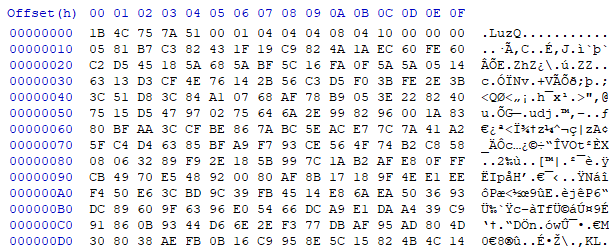
It certainly does not look like text, but it is also not normal bytecode. More research showed that this is a custom encryption scheme that Plugwise made to protect its Intellectual Property (IP) on all it's products. Some reverse-engineering efforts later we obtained a simple Python script that is able to decrypt both the encrypted bytecode and the encrypted source code. The encryption key was placed in the Lua interpreter itself and hence easily obtainable through static reverse-engineering.
import sys, sys, binascii, struct, lzma, tempfile
from Crypto.Cipher import AES

KEY = binascii.unhexlify('00000000000000000000000000000000') # REDACTED
HEADER_1 = b'\x1clUZ'
HEADER_2 = b'\x1bLuz'

with open(sys.argv[1], 'rb') as f:
	header = f.read(4)

	if header == HEADER_1 or header == HEADER_2:
		xz = tempfile.TemporaryFile()

		# Check if this is encrypted bytecode or source code
		if header == HEADER_1:
			print('Lua encrypted')
			prefix = b''
		elif header == HEADER_2:
			print('Lua encrypted bytecode')
			prefix = b'\x1bLua' + f.read(12)

		# Setup main cipher
		cipher = AES.new(KEY, AES.MODE_ECB)
		iv = cipher.decrypt(f.read(16))
		counter = 1

		# Read the complete file
		while True:
			block = f.read(16)
			if block is None or len(block) <= 0:
				break

			# Support for the custom IV
			block_iv = iv[:-4] + struct.pack('>I', struct.unpack('>I', iv[-4:])[0] ^ counter)
			block_iv = cipher.encrypt(block_iv)
			xz.write(bytes([block[i] ^ block_iv[i] for i in range(0, len(block))]))

			counter += 1

		# Now unpack the decrypted (but compressed) file
		xz.seek(0)
		with open(sys.argv[1] + 'dec.lua', 'wb') as fo:
			fo.write(prefix)
			fo.write(lzma.open(xz).read())
		xz.close()
	else:
		print('File not supported!')
After decrypting all files we have obtained the original source code (including comments and TODO's) and bytecode. Further analysis can be performed to find other potential ways to compromise the system via specially crafted HTTP requests. This is especially an interesting attack vector because the web-interface is running under the root user.
A gift that keeps on giving
During the investigation of the file system and the web-interface, a feature called SSH relay kept popping up. Normally, SSH relays are used to bypass firewalls through setting up reverse tunnels. The Anna thermostat is installed in unknown networks and SSH relays can be used to keep access to the device from the outside.
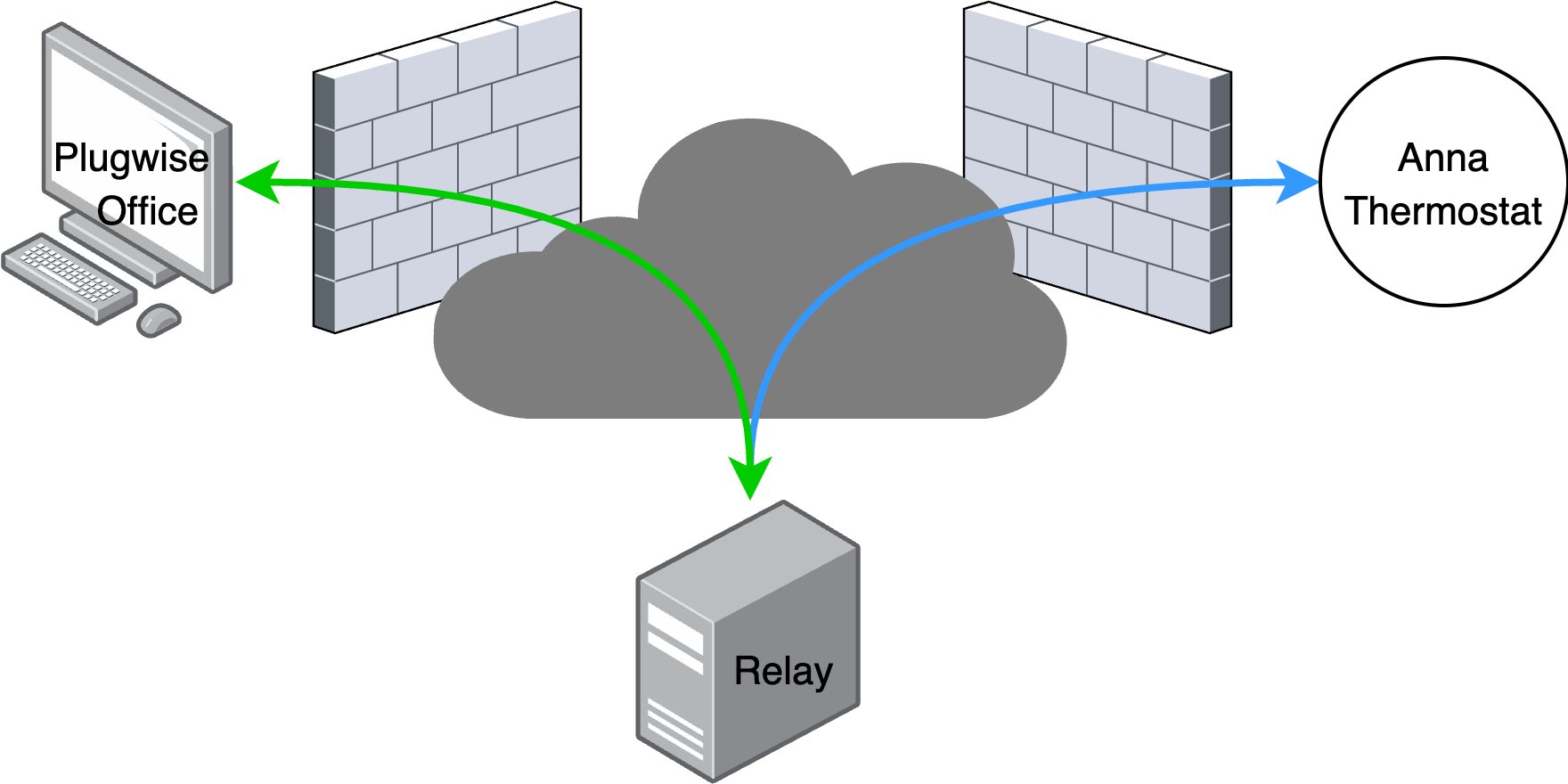
Upon closer examination, this was exactly what Anna was doing to give Plugwise access to the device after deployment in the field. There can be many valid reasons for implementing such a feature, but if it is not done securely, it essential creates a massive security hole in the consumers home network. To that end, I decided to investigate how the reverse tunnels were created.
Opening the Anna thermostat to the world!
Plugwise has a complex and dynamic HTTP API to let the devices interface with the back-end. One of these endpoints is used to obtain a private key to login in the back-end and setup a reverse SSH tunnel. If the SSH users on the remote server is not properly protected, an attacker could use this private key to gain an unprivileged shell on the back-end.
While the architecture of using SSH reverse tunnels is not the best, it is not wrong if setup correctly. To verify that an attacker is unable to compromise the server easily, I performed the same API requests as Anna to obtain the private key. With the private key I could try to setup an interactive SSH shell, fully expecting it to fail as only tunnels are needed.
Last login: Sat Jun 16 18:29:42 2018

       __|  __|_  )
       _|  (     /   Amazon Linux AMI
      ___|\___|___|

https://aws.amazon.com/amazon-linux-ami/2014.03-release-notes/
59 package(s) needed for security, out of 336 available
Run "sudo yum update" to apply all updates.
Amazon Linux version 2018.03 is available.
[sshrelay_fc81b@ip-10-36-41-6 ~]$
You can understand my horror when I was presented with this message. I immediately terminated the SSH session and thought about what happened. Not only did we get a low privileged shell, the system was running an image from 2014! That means that there are a multitude of privilege escalation exploits available to gain root on this system. Who knows how other servers are connected and how a root user on the relay system can move laterally through the Plugwise back-end network. There was only one final issue that I wanted to verify before contacting Plugwise. If an attacker knows the IP of the Plugwise relay server, can the attacker perform a port scan and connect directly to devices deployed in home networks?
The final touch
When performing a simple port scan on the relay server, I was presented with the following open port list.
Discovered open port 22/tcp on 18.202.0.0
Discovered open port 42371/tcp on 18.202.0.0
Discovered open port 42104/tcp on 18.202.0.0
...
Discovered open port 43690/tcp on 18.202.0.0
Discovered open port 43370/tcp on 18.202.0.0
In total there were 205 reverse SSH tunnels that go directly to a Plugwise device in some home network. Luckily, the SSH servers in the devices only allow a root user to login with an SSH key that I did not yet have (hopefully it was not present on the server). However, the fact that these devices puncture holes in home network firewalls and listen on a public accessible server is far from ideal.
Mitigation
This product was interesting as it contained no significant security countermeasures until the Lua application which almost felt disproportional. However, the customized secured Lua interpreter was easily defeated because it was security through obscurity.
While analyzing this device, we identified common mistakes which can be mitigated through generic pointers on how to improve the security of embedded and IoT devices. The list below is far from complete but offers some high level guidance on IoT security enhancements.
Hardware:
- Disable or lock debug interfaces in production to prevent attackers from easily learning about the system internals.
- When possible, use a SoC or somehow hide the flash IC to prevent attackers dumping the flash directly.
Software:
- Protect keys by moving them to hardware or runtime to prevent attackers from obtaining the key through static analysis alone. This significantly raises the effort required (runtime control of the device) by an attacker.
- Privilege separation of application to add a layered defense. In that case, compromise of the web-interface (if possible) would only lead to a low privileged user.
Back-end:
- Make sure that all back-end server are kept fully up to date at all times (preferable automatically).
- While relay servers can be useful, it is often not the best solution from a security point of view. On the off chance that a relay server is used, make sure that only you can access the reverse/forward tunnels.
Timeline
- 2018-06-16 – Vulnerabilities reported to Plugwise
- 2018-10-07 – Confirmation that back-end server were patched and relay users hardened
- 2018-11-07 – Original post published
- 2025-05-15 – Paraphrased post republished